> ## Documentation Index
> Fetch the complete documentation index at: https://outcrawl.ai/docs/llms.txt
> Use this file to discover all available pages before exploring further.
# Overview
> Scout is the open-source browser agent behind Outcrawl's hosted agent. Tell it the task, it opens a browser and gets it done.
export const OutcrawlStyles = () => {
if (typeof document !== 'undefined' && !document.getElementById('outcrawl-overrides')) {
const s = document.createElement('style');
s.id = 'outcrawl-overrides';
s.textContent = `
/* Match the product's radius grid (4 / 6 / 8 / 9999), not Mintlify's default. */
.rounded-sm { border-radius: 0.375rem !important; } /* 6px, --r-ctl */
.rounded-md { border-radius: 0.375rem !important; } /* 6px, --r-ctl */
.rounded-lg { border-radius: 0.5rem !important; } /* 8px, --r-panel */
.rounded-l-sm { border-top-left-radius: 0.375rem !important; border-bottom-left-radius: 0.375rem !important; }
.rounded-r-sm { border-top-right-radius: 0.375rem !important; border-bottom-right-radius: 0.375rem !important; }
.rounded-l-md { border-top-left-radius: 0.375rem !important; border-bottom-left-radius: 0.375rem !important; }
.rounded-r-md { border-top-right-radius: 0.375rem !important; border-bottom-right-radius: 0.375rem !important; }
.rounded-l-lg { border-top-left-radius: 0.5rem !important; border-bottom-left-radius: 0.5rem !important; }
.rounded-r-lg { border-top-right-radius: 0.5rem !important; border-bottom-right-radius: 0.5rem !important; }
/* Cards: never pure white in light mode, matching the one-big-card surface tone. */
.card { background-color: #fcfcfc !important; border-radius: 0.5rem !important; }
html.dark .card { background-color: #141311 !important; }
/* Docs hero box */
.oc-hero { background-color: #fcfcfc; border: 1px solid #e5e2dc; }
html.dark .oc-hero { background-color: #141311; border-color: #26241f; }
html.dark .oc-hero h1 { color: #edeae4; }
/* Thin, transparent-track, hide-until-hover scrollbar. */
::-webkit-scrollbar { width: 6px; height: 6px; background-color: transparent; }
::-webkit-scrollbar-track { background-color: transparent; }
::-webkit-scrollbar-thumb { background-color: rgba(155, 155, 155, 0.5); border-radius: 10px; transition: opacity 0.3s ease; opacity: 0; }
::-webkit-scrollbar-thumb:hover { background-color: rgba(155, 155, 155, 0.7); }
*:hover::-webkit-scrollbar-thumb,
*:focus::-webkit-scrollbar-thumb,
*:active::-webkit-scrollbar-thumb { opacity: 1; }
* { scrollbar-width: thin; scrollbar-color: rgba(155, 155, 155, 0.5) transparent; }
`;
document.head.appendChild(s);
}
return null;
};
Describe what you need in plain words. Scout opens a real browser, reads the page, clicks, types and scrolls until the job is done, then hands back the answer. If it cannot finish, it tells you what is missing and returns what it found.
Scout is the agent behind Outcrawl's [hosted agent](/docs/agents/overview), published as it runs there: the same loop, the same model harness and the same browser binding. It is open source under Apache-2.0 at [github.com/outcrawlai/scout](https://github.com/outcrawlai/scout), and installs from npm as `@outcrawl/scout`. You bring the browser and the models.
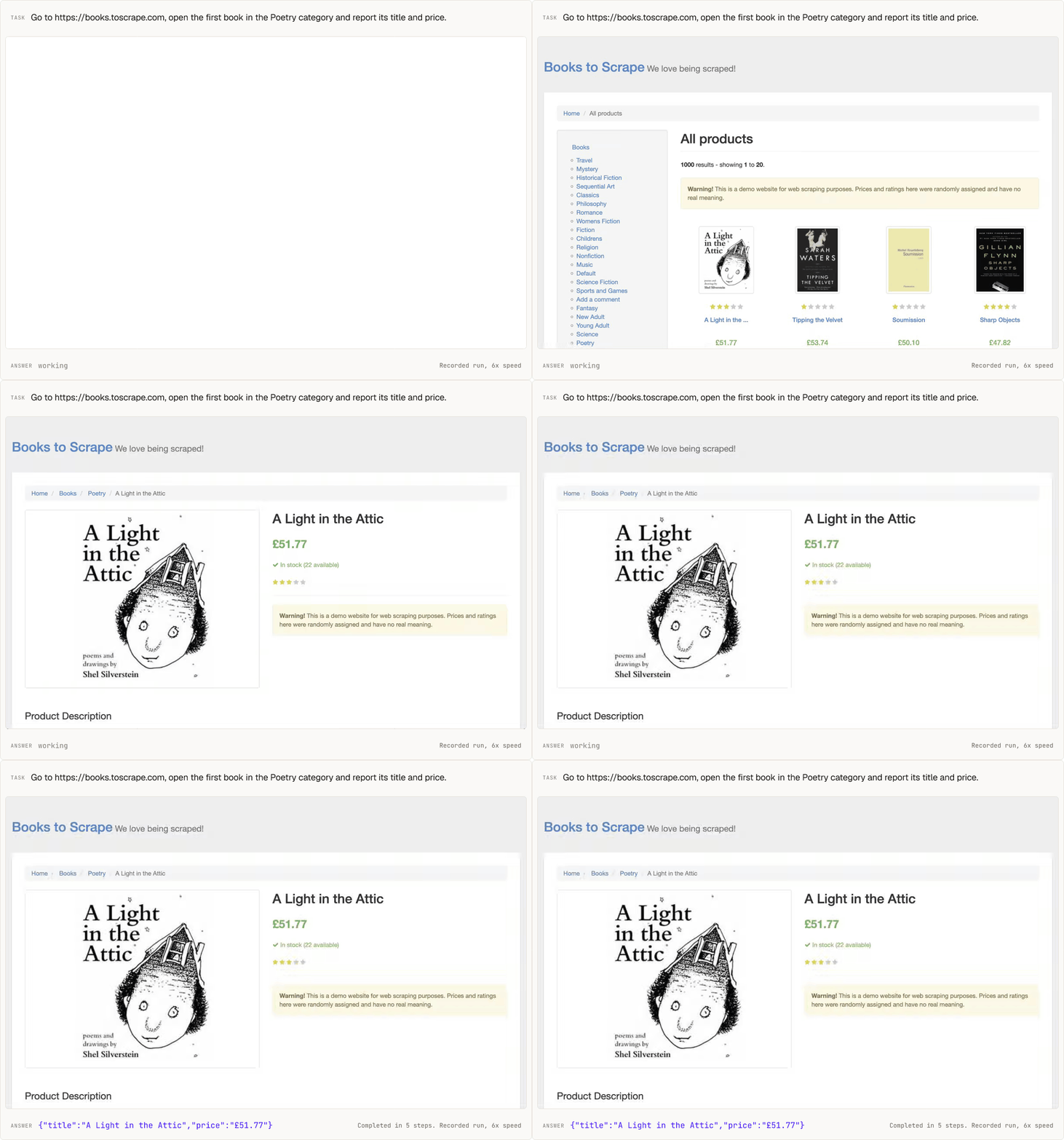
 A recorded run on Outcrawl's cloud, 13 October 2026, shown at 6x speed with nothing cut.
* **Best on Outcrawl's cloud.** One line, `browser: 'outcrawl'`, gives Scout a browser that sites treat like anyone at home, with captcha solving and a replay of every run. It also drives a local browser it launches for you, or any browser you already run over the DevTools protocol.
* **Your models, one per job.** Any endpoint that speaks the chat completions API: a hosted provider, a gateway, or a server on your own machine. There is no default model.
* **An answer even when a run falls short.** A run that hits a limit or cannot finish still returns what it found, and says what is missing.
```ts theme={"theme":{"light":"github-light","dark":"catppuccin-mocha"}}
import { Scout } from '@outcrawl/scout';
const scout = new Scout({
browser: 'outcrawl',
models: {
hands: {
model: 'your-model-id',
baseURL: 'https://your-endpoint/v1',
apiKey: process.env.SCOUT_API_KEY ?? '',
},
},
});
const result = await scout.run(
'Find the top three stories on Hacker News right now',
);
console.log(result.data);
console.log(result.replayUrl); // watch the whole run
```
## Scout or the hosted agent
Both run the same agent. Pick by where you want the loop to live.
* **Scout** runs in your own process, on Node 22 or later. You name a model for each job and pay your model endpoints directly. On Outcrawl's cloud the browser session is billed in credits; on your own browser Outcrawl bills nothing.
* **The [hosted agent](/docs/agents/overview)** runs on Outcrawl's side behind one API call, from the SDKs, the CLI or MCP. A run is billed in credits for model usage, browser time and proxy usage, and you read its status and results separately.
Install, add your keys and run a first task on the cloud.
Outcrawl's cloud, a local Chromium, or any browser over CDP.
One model per job, on any chat completions endpoint.
Caps, schemas, live steps, the result and the errors.
Research, a form, a compare, a sign-in, and the cloud.
What the cloud adds, and how a session is billed.
This documentation is built and hosted on [Mintlify](https://mintlify.com), a developer documentation platform.
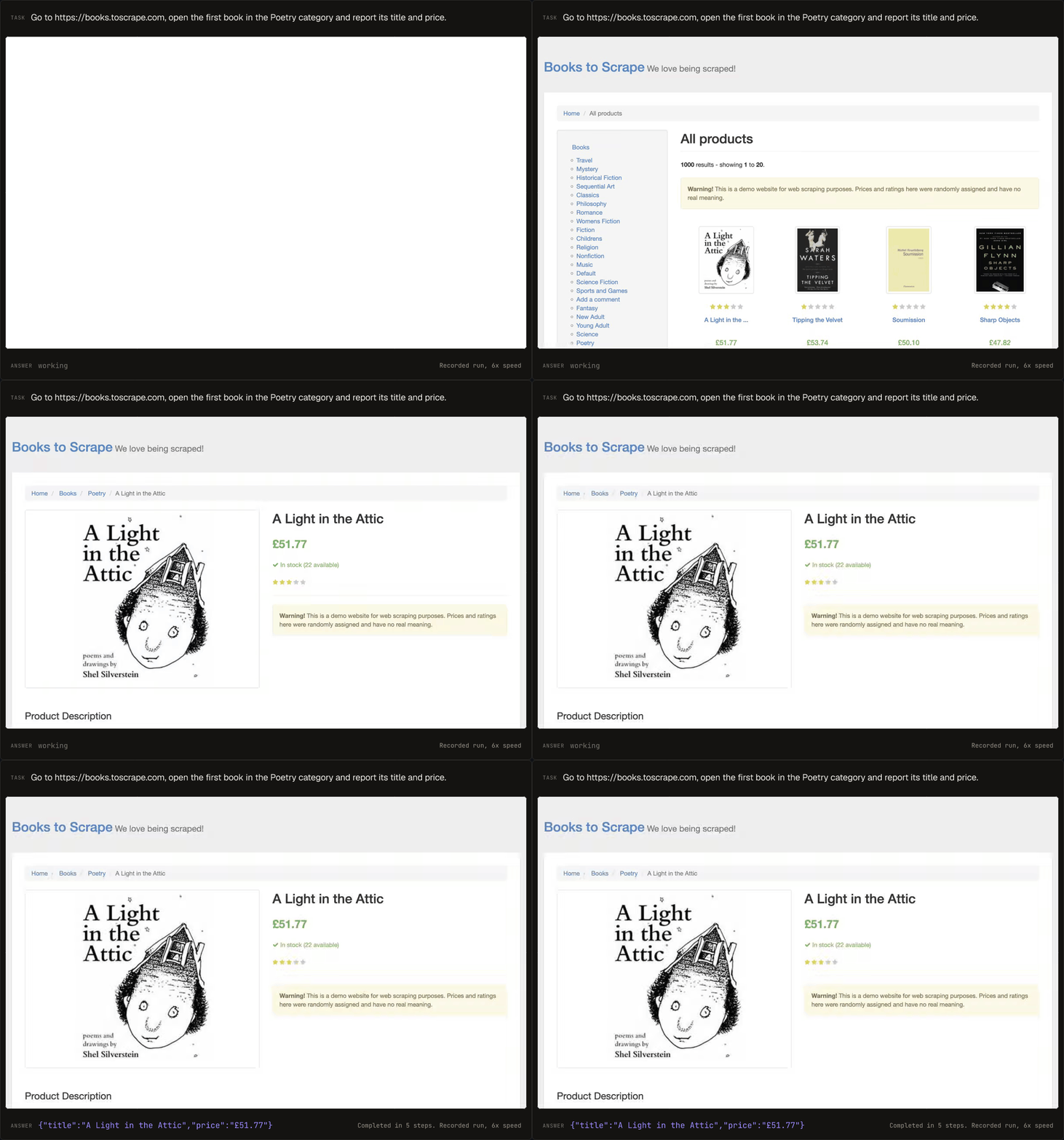
A recorded run on Outcrawl's cloud, 13 October 2026, shown at 6x speed with nothing cut.
* **Best on Outcrawl's cloud.** One line, `browser: 'outcrawl'`, gives Scout a browser that sites treat like anyone at home, with captcha solving and a replay of every run. It also drives a local browser it launches for you, or any browser you already run over the DevTools protocol.
* **Your models, one per job.** Any endpoint that speaks the chat completions API: a hosted provider, a gateway, or a server on your own machine. There is no default model.
* **An answer even when a run falls short.** A run that hits a limit or cannot finish still returns what it found, and says what is missing.
```ts theme={"theme":{"light":"github-light","dark":"catppuccin-mocha"}}
import { Scout } from '@outcrawl/scout';
const scout = new Scout({
browser: 'outcrawl',
models: {
hands: {
model: 'your-model-id',
baseURL: 'https://your-endpoint/v1',
apiKey: process.env.SCOUT_API_KEY ?? '',
},
},
});
const result = await scout.run(
'Find the top three stories on Hacker News right now',
);
console.log(result.data);
console.log(result.replayUrl); // watch the whole run
```
## Scout or the hosted agent
Both run the same agent. Pick by where you want the loop to live.
* **Scout** runs in your own process, on Node 22 or later. You name a model for each job and pay your model endpoints directly. On Outcrawl's cloud the browser session is billed in credits; on your own browser Outcrawl bills nothing.
* **The [hosted agent](/docs/agents/overview)** runs on Outcrawl's side behind one API call, from the SDKs, the CLI or MCP. A run is billed in credits for model usage, browser time and proxy usage, and you read its status and results separately.
Install, add your keys and run a first task on the cloud.
Outcrawl's cloud, a local Chromium, or any browser over CDP.
One model per job, on any chat completions endpoint.
Caps, schemas, live steps, the result and the errors.
Research, a form, a compare, a sign-in, and the cloud.
What the cloud adds, and how a session is billed.
This documentation is built and hosted on [Mintlify](https://mintlify.com), a developer documentation platform.